Modes
Layer Mode
Will target your selected layer.
Selection Mode
Will target a selection in your current selection.
This mode has two sub-modes: Basic & Outline.
Basic will work as an effect later mask, while Outline will create an outline outside your selection.
Target
In Layer Mode
Stores your selected layer
In Outline Mode
Stores your selection & layer
Render Toggles
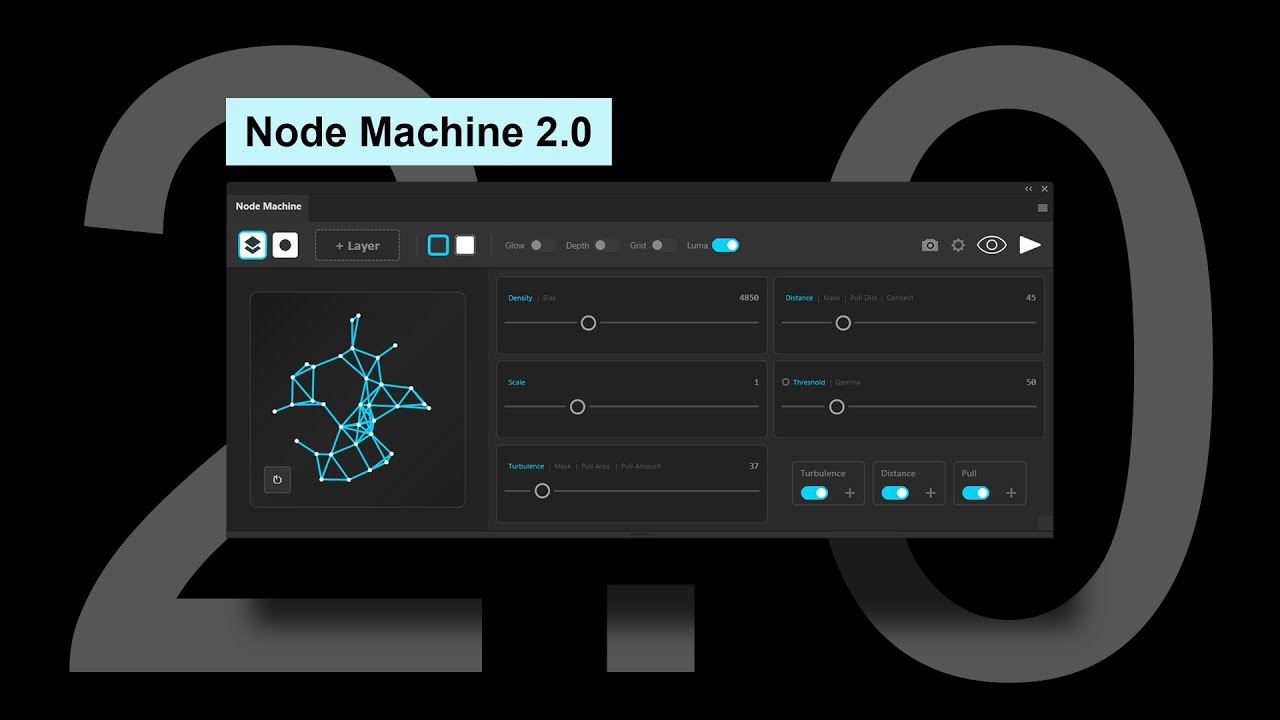
Glow
Merges Dots & Lines and finishes by adding a glow filter chain.
Depth
Depending on layer light values, scales up or down dot & line sizes.
Grid
Generates points on a grid instead of randomly.
Settings, Preview, Render
Settings
Change UI Theme, Reset Sliders & Deactivate License.
Preview
Enter live preview mode to see your changes in real time.
Render
Press render to lock your effect and finish editing.
Generation Settings
Density
Determines number of dots generated.
Distance / Mask
Distance determines how far dots look to create connection lines.
Mask uses the Turbulence Map to mask where connections are made.
Scale / Grid
Scale determines the size of the dots & lines.
Grid determines the grid size.
Threshold
Adjusts the spawn location of the dots, depending on the light.
Turbulence
Displaces dots independently on a set direction.
Generation Seed & Turbulence Map
Seed
Every generation of dots is different, clicking this button will randomize generation and displacement.
Map
Will create a layer named "Turbulence_Map" that uses light values to mask the displacement, and if used, Distance too.
Guides & Tutorials
Node Machine | Beginner's Guide
Node Effect In Photoshop | Node Machine Tutorial
Quick Tips
Need More Help?
Send an email to hello@synkit.net describing your issue.
Include your order email, access key, PS version & screenshots.